> For the complete documentation index, see [llms.txt](https://dailyjournal.gitbook.io/game-development/llms.txt). Markdown versions of documentation pages are available by appending `.md` to page URLs; this page is available as [Markdown](https://dailyjournal.gitbook.io/game-development/unity/graphics/render-pipeline.md).
# Render Pipeline
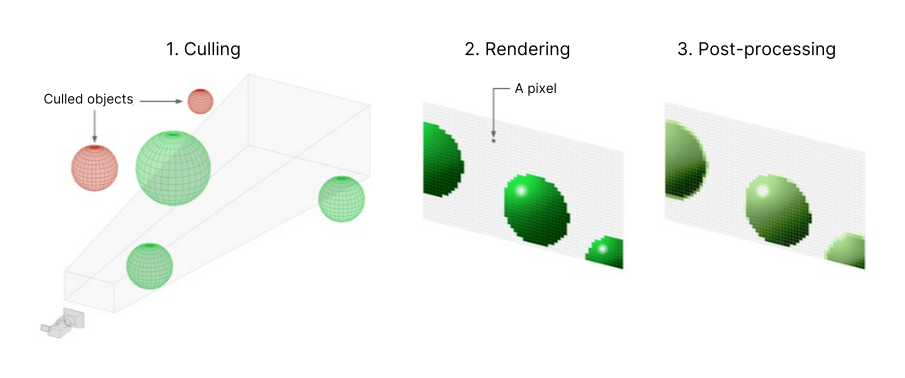
At a high level, these operations are:
* **Culling**; it lists the objects that need to be rendered, preferably the ones visible to the **camera** ([frustum culling](https://docs.unity3d.com/Manual/UnderstandingFrustum.html)) and unoccluded by other objects ([occlusion culling](https://docs.unity3d.com/Manual/OcclusionCulling.html)).
* **Rendering**, is the drawing of these objects, with the correct lighting and some of their properties, into pixel-based buffers.
* **Post-processing** operations can be carried out on these buffers, for instance applying color grading, bloom and depth of field, to generate the final output frame that is sent to a display device.
Different render pipelines have different capabilities and performance characteristics, and are suitable for different games, applications, and platforms.It can be difficult to switch a Project from one render pipeline to another, because different render pipelines use different **shader** outputs, and might not have the same features. It is therefore important to understand the different render pipelines that Unity provides, so that you can make the right decision for your project early in development.Unity offers the following render pipelines:
* The [Built-in Render Pipeline](https://docs.unity3d.com/Manual/built-in-render-pipeline.html) is Unity’s default render pipeline. It is a general-purpose render pipeline that has limited options for customization.
* The [Universal Render Pipeline (URP)](https://docs.unity3d.com/Manual/universal-render-pipeline.html) is a Scriptable Render Pipeline that is quick and easy to customize, and lets you create optimized graphics across a wide range of platforms.
* The [High Definition Render Pipeline (HDRP)](https://docs.unity3d.com/Manual/high-definition-render-pipeline.html) is a Scriptable Render Pipeline that lets you create cutting-edge, high-fidelity graphics on high-end platforms
{% embed url="" %}
* You can create your own [custom render pipeline](https://docs.unity3d.com/Manual/srp-custom.html) using Unity’s Scriptable Render Pipeline API.
> Unity’s **Scriptable Render Pipeline** (SRP) is a feature that allows you to control rendering via **C# scripts**.
Until early 2018, only one render pipeline was available in Unity; the [Built-In Render Pipeline](https://docs.unity3d.com/Manual/built-in-render-pipeline.html).
{% embed url="" %}
{% embed url="" %}
{% embed url="" %}
---
# Agent Instructions
This documentation is published with GitBook. GitBook is the documentation platform designed so that both humans and AI agents can read, navigate, and reason over technical content effectively. Learn more at gitbook.com.
## Querying This Documentation
If you need additional information that is not directly available in this page, you can query the documentation dynamically by asking a question.
Perform an HTTP GET request on the current page URL with the `ask` query parameter, and the optional `goal` query parameter:
```
GET https://dailyjournal.gitbook.io/game-development/unity/graphics/render-pipeline.md?ask=&goal=
```
`ask` is the immediate question: it should be specific, self-contained, and written in natural language.
`goal` is optional and describes the broader end goal you are ultimately trying to accomplish on behalf of the user. GitBook uses it to tailor the answer towards what is most useful for that goal.
The response will contain a direct answer to the question and relevant excerpts and sources from the documentation.
Use this mechanism when the answer is not explicitly present in the current page, you need clarification or additional context, or you want to retrieve related documentation sections.